 LLC
How users sign up for Ackwell text alerts
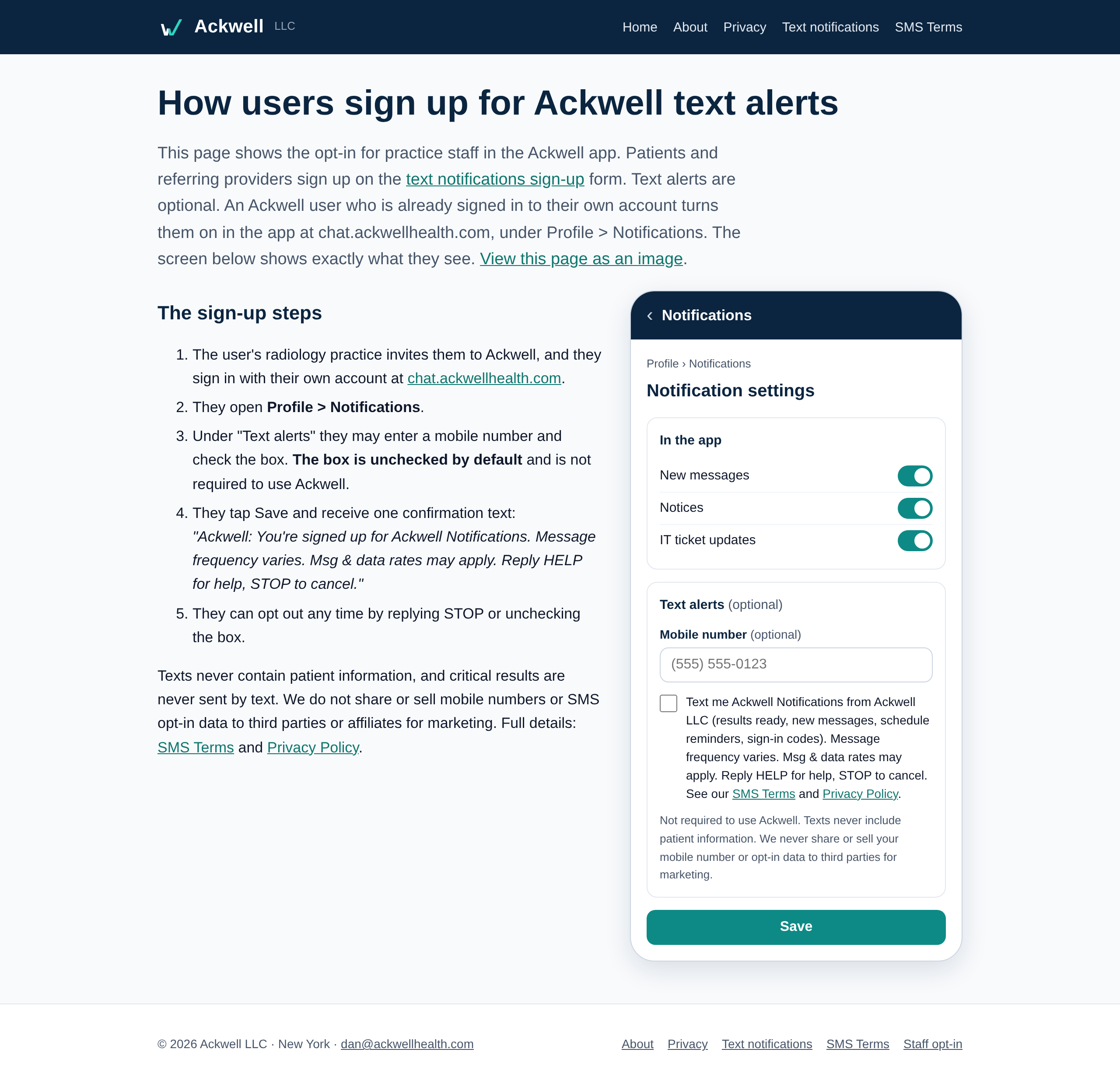
This page shows the opt-in for practice staff in the Ackwell app. Patients and referring providers sign up on the text notifications sign-up form. Text alerts are optional. An Ackwell user who is already signed in to their own account turns them on in the app at chat.ackwellhealth.com, under Profile > Notifications. The screen below shows exactly what they see. View this page as an image.
The sign-up steps
- The user's radiology practice invites them to Ackwell, and they sign in with their own account at chat.ackwellhealth.com.
- They open Profile > Notifications.
- Under "Text alerts" they may enter a mobile number and check the box. The box is unchecked by default and is not required to use Ackwell.
- They tap Save and receive one confirmation text:
"Ackwell: You're signed up for Ackwell Notifications. Message frequency varies. Msg & data rates may apply. Reply HELP for help, STOP to cancel." - They can opt out any time by replying STOP or unchecking the box.
Texts never contain patient information, and critical results are never sent by text. We do not share or sell mobile numbers or SMS opt-in data to third parties or affiliates for marketing. Full details: SMS Terms and Privacy Policy.